Output Messenger Server can store the data in any of the following databases.
- SQLite (Default)
- MySQL
- MS SQL Server
SQLite
By default, SQLite Database will be used. No configuration needed for this database file.
The database file OMLs.db3 will be generated in the Server installed folder.
To back up SQLite database file:
Stop the server service & copy the file to your backup location.
To Restore:
Stop the server service & replace the file with your backup file.
MySQL / MSSQL Server
To select the other database options, in Server Manager > Configuration > click “Switch Database” Link:
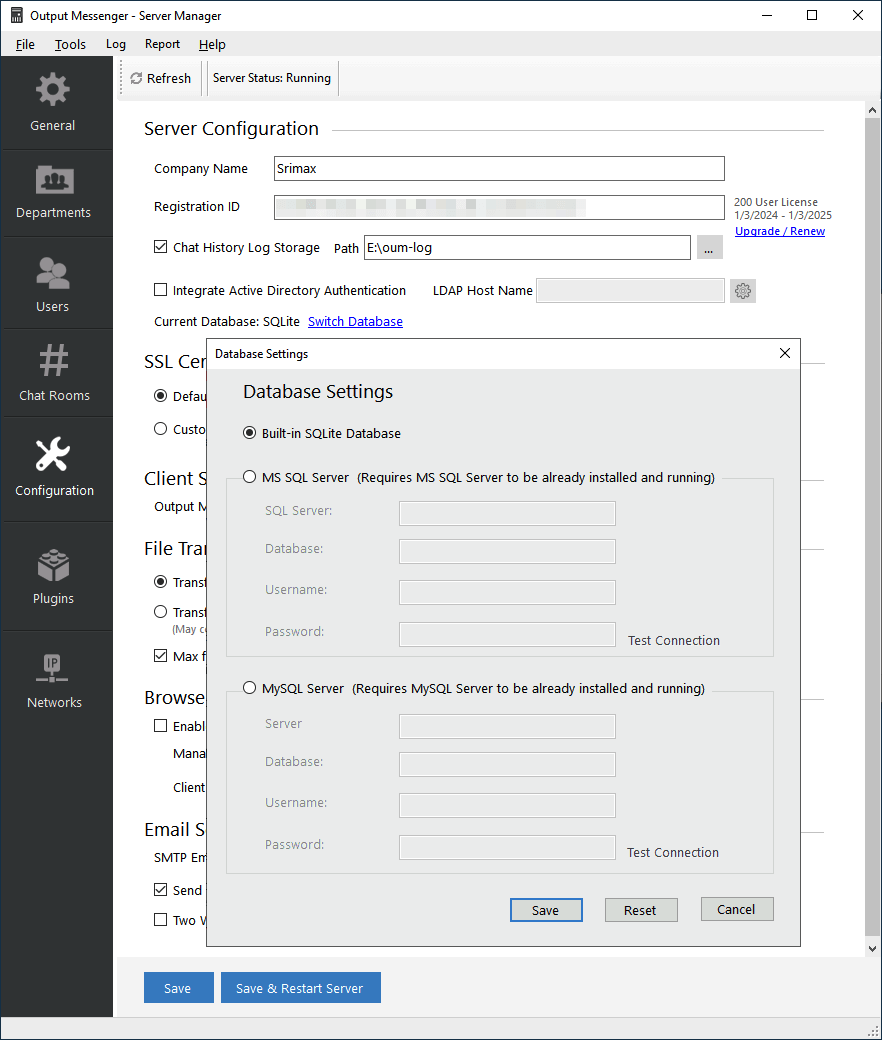 To use MySQL or MS SQL Server, create a database for Output Messenger in Server & provide the Server, Database & Login Details.
Output Messenger Server will create the needed tables in the provided database at run time.
When switching from the default database to MS SQL Server or MySQL, the system will prompt you to migrate data with the message:
“Do you want to copy all existing data to the new database?” If you click “Yes“, all existing data, including users, will be transferred.

Note:
- All User Passwords are stored in the database table by applying hash algorithm.
- The chat log history will not be stored in database. Logs will be stored in a file format at the specified folder in Configuration.
- Switching from MS SQL or MySQL back to the default database, the system will not prompt for data migration, and existing data will not be copied automatically.


